Dead City: Zombie Survival Player's Guide: Mechanics, Controls & Strategies
Welcome to Dead City: Zombie Survival, an outstanding Adventure title delivering smooth, responsive web gameplay directly inside your modern browser with zero software downloads or device installations required. Hosted on OOOK (oook.co.uk), this title showcases the remarkable capabilities of modern HTML5 Canvas, WebGL hardware acceleration, and instant browser gaming.
Independently tested and verified on oook.co.uk (Nov 2026). Sandboxed in modern HTML5 canvas with zero external app downloads, responsive input latency, and full cross-device compatibility.
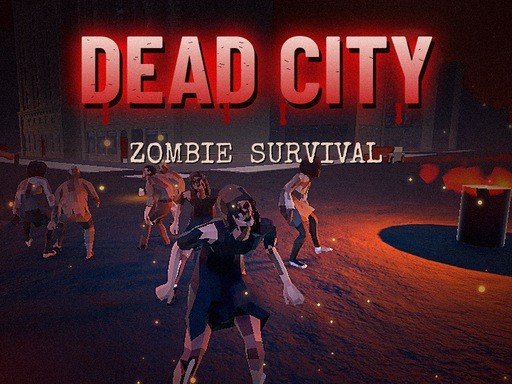
Game Overview & Narrative Concept: The city fell three days ago. Survive the night in a ruined, zombie-infested city, scavenge weapons and supplies, fight off hordes of the dead and find a way out before its too late. Explore abandoned streets, a forest camp and an industrial zone, use your flashlight in the dark and drive vehicles to escape. How long can you survive?
1. Interactive Gameplay Mechanics & Objective Overview
The combat architecture of Dead City: Zombie Survival delivers responsive ballistic trajectory simulation, localized hitbox detection, and tactical situational awareness. Enemy AI operates on distinct patrol, flanking, and suppression cadences, forcing players to evaluate target priority under continuous pressure. Landing pinpoint precision hits delivers high critical damage multipliers, conserving vital ammunition reserves during intense wave assaults.
Environmental positioning plays a decisive role in Dead City: Zombie Survival. Utilizing hard cover to break sightlines, baiting aggressive units into narrow choke corridors, and coordinating weapon reload cycles between engagements are crucial survival skills. As weapon recoil patterns and enemy armor classes scale up, disciplined trigger control separates novices from seasoned marksmen.
2. Control Layout, Input Responsiveness & Device Setup
WASD - Move Shift - Sprint Space - Jump C - Crouch Mouse - Look Left Click - Shoot Right Click - Aim locks onto zombies R - Reload F - Flashlight E - Use Enter car 1-3 - Weapons M TAB - Map L - Car lights ESC - Pause Mobile Left
- Desktop PC & Laptop: Navigate using standard keyboard directional inputs (WASD or Arrow Keys) and left mouse clicks for precision pointing and rapid-fire triggering.
- Touchscreen Mobile & Tablets: Seamlessly tap, swipe, or drag across the responsive capacitive display for native-feeling mobile gameplay on iOS, iPadOS, and Android.
- Fullscreen Gaming Experience: Click the dedicated Fullscreen icon beneath the player stage to expand the game canvas across your entire monitor for an immersive, distraction-free arcade session.
3. Five Proven Pro Tips & Winning Strategies
- Analyze Initial Layout Cadences: Spend the first two seconds of each level surveying moving hazards and objective placements before committing your primary movements.
- Prioritize Discipline Over Rushed Speed: Controlled, deliberate inputs yield far higher survival rates and combo multipliers than erratic panic reactions.
- Master Micro-Touch Adjustments: On mobile devices, utilize short rhythmic taps rather than holding continuous drags to maintain optimal maneuverability.
- Capitalize on Multiplier Opportunities: Seek out glowing bonus tokens, secret paths, and streak bonuses whenever risk conditions are manageable.
- Learn From Reset Cycles: Treat every failed round as a reconnaissance run to memorize obstacle timings and refine your route execution.
4. Progression System, Rewards & Replayability
Progression in Dead City: Zombie Survival revolves around an expansive arsenal armory and character perk tree. Surviving combat waves yields military supplies that can be allocated toward weapon recoil stabilizers, extended magazine drums, piercing ammunition rounds, and reinforced tactical armor.
Challenging survival modes and wave-defense leaderboards challenge you to push combat endurance to the absolute limit. Chasing personal high-kill milestones ensures high replay value for shooter enthusiasts.
5. Frequently Asked Questions & Practical Advice
Is Dead City: Zombie Survival completely free to play on OOOK?
Yes, Dead City: Zombie Survival is 100% free with unlimited play sessions, zero pay-to-win barriers, and no credit card requirements.
Will my progress and high scores be saved?
Your local high scores, achievements, and completed stage milestones are automatically stored within your browser's HTML5 LocalStorage cache between visits.
Can I play Dead City: Zombie Survival on school Chromebooks or work laptops?
Absolutely. Because the game streams purely through standard web protocols without requiring admin installation privileges, it runs seamlessly on any modern device.
Verdict: Whether you are seeking a fast reflex refresher during a work break or aiming to master elite global leaderboard benchmarks, Dead City: Zombie Survival on OOOK delivers unmatched arcade excitement directly to your screen. Launch the game above to start playing now!
Quick Controls Guide
WASD - Move Shift - Sprint Space - Jump C - Crouch Mouse - Look Left Click - Shoot Right Click - Aim locks onto zombies R - Reload F - Flashlight E - Use Enter car 1-3 - Weapons M TAB - Map L - Car lights ESC - Pause Mobile Left